First appointments
For whom, general reason (back, neck, headaches, after a sport or an accident), how long, osteopath requested, availability: the request arrives complete, ready to confirm.
New patients, babies, pregnancy, cancellations, receipts and insurance: it answers your patients 24/7, in Quebec French or English, while your osteopaths are in session. It never gives clinical advice.

An osteopathy clinic’s phone often rings mid-session, and the questions come back again and again: for whom, when, how much, and the receipt. Zenicall handles them by your rules, with your clinic’s information.
For whom, general reason (back, neck, headaches, after a sport or an accident), how long, osteopath requested, availability: the request arrives complete, ready to confirm.
It talks with the parent, notes the baby’s age in weeks or months and what the parent observes, then routes to the osteopath on your team who sees little ones.
It knows whether your clinic sees pregnant patients and notes how far along they are if you ask. For any concern, it refers them to their doctor, midwife or 811.
First session, follow-up, baby: each appointment type keeps its own length. A freed slot is flagged so you can fill it, even on a Sunday evening.
What your receipt shows, your association member number, a duplicate, direct billing if you offer it: it answers with your instructions and never promises reimbursement.
It understands Quebec French and answers in the patient’s language, even if they switch mid-call.
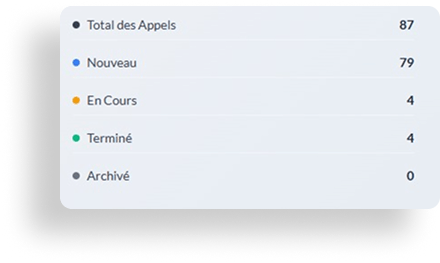
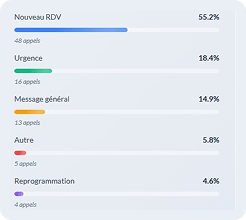
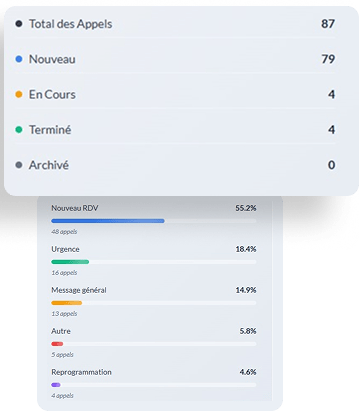
Every call becomes a clear summary, by email or in your practice management software: who called, for whom, why and what to do next. The transcript and recording stay available, on our servers in Canada.
To do: offer a baby slot with the osteopath who sees infants, Tuesday or Thursday morning.
These are the calls that matter most, and they often come when the clinic is closed. Here is what happens.
From what the caller describes and the list written with you: trouble breathing, chest pain, sudden weakness, high fever in a baby, bleeding during pregnancy. It never performs a clinical assessment.
Immediate danger: it directs them to 911 or the emergency room. Health advice: to Info-Santé at 811, per your instructions.
Worrying pain after a session: priority message to the osteopath, a callback at opening or a transfer if you set it up. You choose, depending on the time.
Osteopaths often work alone or in small teams, without a full-time front desk. During a session, the phone rings unanswered.
3,000+
osteopaths practising in Quebec. During a session, none of them can pick up.
24/7
The receptionist answers during your sessions, in the evening and on weekends, in French and English.
24–48 h
to go live, with no contract. You approve its answers before it picks up.
Olivier is an osteopath. He rents two rooms in a neighbourhood clinic and works without a receptionist. What he loves is taking his time with each patient, a full hour if needed.
Meanwhile, his phone buzzes on silent in his pocket. In the evening, he calls back: a cancellation for tomorrow, a question about a receipt, a parent hoping to get a spot for their baby.
He thinks back to the mother who left a message on a Thursday evening. When he called her back the next day at noon, she had found another clinic that had answered.
That’s when he asked himself: what if every call got an answer, without cutting a session short?
With these 32 hours freed every month, your clinic could:
Few AI receptionists really talk about osteopathy in Quebec. Here is what we do, without empty promises.
It’s the question callers ask most. It explains what your clinic provides and invites the patient to check their coverage with their insurer. No promise of reimbursement.
What the receipt shows, tax credits, sales taxes: it reads the answer you approved, or passes the question on. You decide what it says.
$200 or $340 a month, minutes included, with the setup fee published too. You know the price before the demo, and you can stop anytime.
Servers and recordings in Canada, designed for Law 25, practices aligned with HIPAA. Custom integration with Jane, GoRendezvous or ClinicMaster, configured during onboarding.
Compare AI receptionists in Quebec →Zenicall also answers for physiotherapy, chiropractic and other clinics →
Cheaper than a secretary position, more responsive than an automated switchboard.
Your clinic is starting to miss calls and wants to answer them without hiring staff.
You handle high call volume, several practitioners or several clinics.
+ $350 one-time setup fee, paid at go-live (includes deployment, custom configuration and team training)
Tell us how your clinic’s calls are handled today. We set up a receptionist with your clinic’s name, hours, osteopaths and instructions, and you call it yourself, free of charge.
We reply the next business day. No commitment.
Yes. Each appointment type has its own length (first session, follow-up, baby), and you tell it each osteopath’s schedule and clientele. A patient who asks for someone specific, or for a clientele such as perinatal care, is routed to the right place.
Yes, once custom integration is configured during onboarding: Jane, GoRendezvous, ClinicMaster or other software. Without integration, it takes a complete request and your team confirms the slot. It never promises a slot that is not free.
It explains what your clinic provides: a receipt with your professional association member number, a duplicate if needed, direct billing to some insurers if you offer it. It invites the patient to check their coverage with their insurer. It never promises reimbursement.
It gives no tax advice. If you give it an instruction, it reads it as is; otherwise, it notes the question for your team, who will call back.
Yes, if your clinic sees them. For a baby, it talks with the parent and notes the age, what they observe and the osteopath who sees little ones. For a pregnancy, it notes how far along if you ask. It never says what is indicated or safe: those questions go to the osteopath, the doctor, the midwife or 811.
No, by design. It makes no diagnosis and gives no advice on pain, a treatment or which professional to see. It describes your clinic’s services, and clinical questions are noted for the osteopath, who calls back.
It takes the message with context and flags it as a priority for the osteopath, per your protocol. If the caller describes a warning sign from your list (trouble breathing, chest pain, sudden weakness), it directs them to 911 or the emergency room. For health advice, it points to Info-Santé at 811.
It notes that it was an accident, the date and the file number if the patient has one, for your team. It says nothing about what an agency or insurer will pay: your team answers that.
Yes, 24/7. You choose when it takes over: all the time, after a few rings or only outside opening hours. It doesn’t replace your front desk: it takes the calls no one can take.
Yes. It understands Quebec French and answers in the patient’s language, even if they switch mid-call. It introduces itself as your clinic’s virtual assistant, and a patient who wants to talk to someone can ask.
Zenicall is designed for Law 25. Our servers and your recordings are in Canada, and the AI providers that process calls in real time are bound by data processing agreements. A privacy impact assessment (PIA) is available on request. Your clinic remains responsible for its patients’ information; Zenicall acts as a service provider.
Between 24 and 48 hours, remotely. We configure your hours, session types and lengths, your osteopaths and their clienteles, what appears on your receipts, your cancellation policy and what must always go to the osteopath with you.
$200 or $340 a month, minutes included, plus a one-time $350 setup fee. No contract: you can stop anytime, with a 30-day money-back guarantee. Details are in the Pricing section of this page.
Yes. Each appointment type has its own length (first session, follow-up, baby), and you tell it each osteopath’s schedule and clientele. A patient who asks for someone specific, or for a clientele such as perinatal care, is routed to the right place.
Yes, once custom integration is configured during onboarding: Jane, GoRendezvous, ClinicMaster or other software. Without integration, it takes a complete request and your team confirms the slot. It never promises a slot that is not free.
It explains what your clinic provides: a receipt with your professional association member number, a duplicate if needed, direct billing to some insurers if you offer it. It invites the patient to check their coverage with their insurer. It never promises reimbursement.
It gives no tax advice. If you give it an instruction, it reads it as is; otherwise, it notes the question for your team, who will call back.
Yes, if your clinic sees them. For a baby, it talks with the parent and notes the age, what they observe and the osteopath who sees little ones. For a pregnancy, it notes how far along if you ask. It never says what is indicated or safe: those questions go to the osteopath, the doctor, the midwife or 811.
No, by design. It makes no diagnosis and gives no advice on pain, a treatment or which professional to see. It describes your clinic’s services, and clinical questions are noted for the osteopath, who calls back.
It takes the message with context and flags it as a priority for the osteopath, per your protocol. If the caller describes a warning sign from your list (trouble breathing, chest pain, sudden weakness), it directs them to 911 or the emergency room. For health advice, it points to Info-Santé at 811.
It notes that it was an accident, the date and the file number if the patient has one, for your team. It says nothing about what an agency or insurer will pay: your team answers that.
Yes, 24/7. You choose when it takes over: all the time, after a few rings or only outside opening hours. It doesn’t replace your front desk: it takes the calls no one can take.
Yes. It understands Quebec French and answers in the patient’s language, even if they switch mid-call. It introduces itself as your clinic’s virtual assistant, and a patient who wants to talk to someone can ask.
Zenicall is designed for Law 25. Our servers and your recordings are in Canada, and the AI providers that process calls in real time are bound by data processing agreements. A privacy impact assessment (PIA) is available on request. Your clinic remains responsible for its patients’ information; Zenicall acts as a service provider.
Between 24 and 48 hours, remotely. We configure your hours, session types and lengths, your osteopaths and their clienteles, what appears on your receipts, your cancellation policy and what must always go to the osteopath with you.
$200 or $340 a month, minutes included, plus a one-time $350 setup fee. No contract: you can stop anytime, with a 30-day money-back guarantee. Details are in the Pricing section of this page.
Zenicall is an AI receptionist for businesses and clinics in Quebec. After every call, your team receives a clear summary, by email or directly in your management software: reason, contact details, urgency and next step. An online dashboard with transcripts and statistics is also available on request.