Appointments
Booking, rescheduling or cancelling, at any hour: in your software once integration is configured, or as a complete request your team confirms.
It answers the patients of your nurse practitioner (NP, or IPS in Quebec) clinic 24/7, in Quebec French or English: bookings, new patients, refill requests, questions about your services. Your team stays with patients.

In a nurse practitioner (NP) clinic, calls revolve around the same requests. Zenicall, an AI voice agent set up for your clinic, knows them and handles them by your rules, with your clinic’s information.
Booking, rescheduling or cancelling, at any hour: in your software once integration is configured, or as a complete request your team confirms.
No family doctor? It explains how you register new patients or, per your instructions, Quebec’s primary care access point (GAP), at 811, option 3.
It notes the request, with the patient’s medication and pharmacy, for your team. It never renews a prescription and never shares results.
CNESST, SAAQ, sick notes, pregnancy or chronic disease follow-up: it takes the reason and details so the NP can prepare what comes next.
Many patients don’t know a nurse practitioner can diagnose and prescribe. It explains this in your words, along with your services, fees and hours.
It understands Quebec French and answers in the patient’s language, even if they switch mid-call.
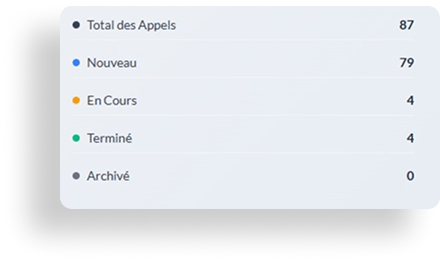
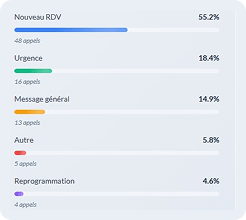
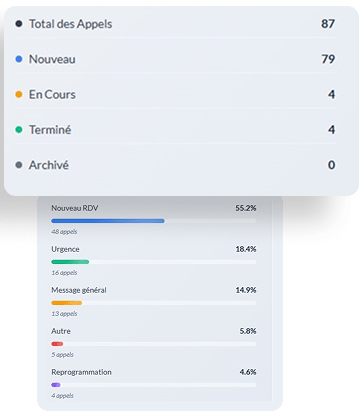
Every call becomes a clear summary, by email or in your management tool: who called, why, how pressing it is and what to do next. The transcript and recording stay available, on our servers in Canada.
To do: check with the NP whether a follow-up is needed before the refill, then call the patient back.
It is often the call that matters most, and the one that comes after the team has gone home. Here is what happens.
From what the patient describes: chest pain, trouble breathing, heavy bleeding. It never performs a clinical assessment.
Immediate danger: it directs them to 911 or the emergency room. Health advice: to Info-Santé at 811, per your instructions.
Transfer to the NP on call, priority message or a callback at opening: you choose, depending on the time.
Chloe is a NP. Her calling is to listen, to heal, to reassure. Yet she often felt like her real boss was the ringing telephone.
Between consultations, she juggled callbacks, appointment bookings, and missed calls that kept piling up.
She thought of Mrs. Gagnon who told her on the phone that she felt lonely, and wished she had more time to talk.
That evening, finishing an hour late again, she asked herself: what if I could get that time back? Not to do more, but to do better.
With these 32 hours freed up each month, you could:
Use case: Clinique THVR, then a new NP clinic, chose Zenicall to automate its phone reception from launch. Here is how our assistant “David” changed their day-to-day during the engagement.
In its start-up phase, a clinic has to be flawless to earn the trust of its first patients. The challenge for Clinique THVR was simple:
How do you offer 24/7 phone availability and handle booking, reminders and follow-ups without adding to the care team's workload?
The AI assistant “David” was configured to become the clinic's first point of contact. It handled autonomously:
Patients could reach the clinic, even in the evening and on weekends.
The assistant handled booking requests; the team stayed in control.
The team focused on patients, not on the ringing phone.
A brand-new clinic, with a polished welcome from the very first call.
Several AI receptionists target medical clinics; few are designed for NP clinics. Here is what sets us apart, without empty promises.
$200 or $340 a month, minutes included, with the setup fee published too. You know the price before the demo, and you can stop anytime.
Servers and recordings in Canada, AI providers bound by data processing agreements, PIA available on request. No absolute promises.
It takes calls during appointments, breaks and after hours. Your team keeps welcoming the patients in front of them.
Configured during onboarding with your clinic software: MEDFAR, OFYS, Omnimed, TELUS Health or another.
Compare AI receptionists in Quebec →Zenicall also answers for dental clinics →
In 24 to 48 hours, your clinic is ready to answer, without changing phones or software.

What you do:
You give us your number and your practice management software (MEDFAR, OFYS, Omnimed, TELUS Health or another).
What we do:
We connect Zenicall to your phone with call forwarding, without changing providers. Integration with your calendar is custom-configured during onboarding.

What you do:
You answer a few simple questions: tone of voice, key phrases, emergency instructions...
What we do:
We train your virtual assistant to speak as if she were part of your team.

What you do:
You test Zenicall by listening to your own calls. You are free to adjust the settings at any time.
What we do:
We handle the launch, technical follow-up and adjustments during the first days.
No cables, no line to cut, no software change. Just a well-configured AI receptionist, attentive to your patients.
Custom integration, configured during onboarding with your clinic's software. Nothing changes in your routine.



The security of your data and that of your patients is integrated from the very first line of code.
We apply recognized health data protection standards, and our main AI providers are bound by HIPAA business associate agreements (BAAs).
Learn more →Our service is built to meet Quebec's Law 25 on the protection of personal information: PIA available on request and signed data processing agreements with our providers.
Learn more →Your data is stored on our servers in Canada, and every AI provider is bound by a signed data processing agreement.
Learn more →Only authorized people can access your data, and access can be revoked at any time.
Learn more →Custom integration, configured during onboarding with your clinic’s software.
Tips and resources to optimize your IPS clinic
Discover how an AI voice assistant can transform call management at your Quebec IPS clinic. Detailed comparison, benefits and return on investment.
Discover the 10 repetitive administrative tasks that can be automated in your IPS clinic to free up care time and reduce your team's workload.
Administrative overload exhausts healthcare teams. Discover concrete strategies to reduce workload and prevent burnout in your IPS clinic.
Cheaper than a secretary position, more responsive than an automated switchboard.
Your clinic is starting to miss calls and wants to answer them without hiring staff.
You handle high call volume, several practitioners or several clinics.
+ $495 one-time setup fee, paid at go-live (includes deployment, custom configuration and team training). Custom integration with your management software: from $1,000, quoted separately.
Tell us in a few words how your calls are handled today.
We reply the next business day. No commitment.
Zenicall picks up warning signs in what the patient describes (chest pain, trouble breathing, heavy bleeding) and follows your protocol: direct them to 911, transfer the call to the NP on call or leave a priority message. It never performs a clinical assessment.
Whatever you tell it to: how you register new patients, your waiting list or, per your instructions, Quebec's primary care access point (GAP), online or by calling 811, option 3. It never promises that a patient will be taken on.
No. It notes the request (medication, pharmacy, expected results) and passes it to your team for follow-up. It never shares results and never gives clinical advice.
Yes, based on what you tell it: your services, your fees, your hours. Many patients don't know that a nurse practitioner can diagnose and prescribe; it explains this in your words.
Yes. Integration with your practice management software — MEDFAR, OFYS, Omnimed, TELUS Health or another — is custom-built and configured during onboarding, with no work on your side. If you prefer to start without integration, every request reaches your team complete and ready to enter.
Yes, once integration with your software is configured during onboarding: it checks your availability and books the appointment. Without integration, it takes a complete request (patient, reason, preferred times) that your team confirms. If a slot can't be booked, the request goes to your team.
Absolutely. You define the tone, standard answers, emergencies and triage instructions. Zenicall adapts to your clinic: your services, your protocols, your NPs' names.
Yes. Our servers and your recordings are in Canada. The AI providers that process calls in real time are bound by signed data processing agreements and covered by a privacy impact assessment (PIA), in line with Quebec's Law 25. Your data is not used to train AI. It is encrypted in transit and at rest, and you retain full ownership of it.
Between 24 and 48 hours. Everything is done remotely. A dedicated advisor configures Zenicall for your clinic and guides you through it.
Yes. Zenicall is available 24/7. Outside office hours, it handles calls according to a scenario you configure: emergency resources (911, Info-Santé 811), transfer to your on-call line, or message taking for a callback the next day.
We always recommend transparency: Zenicall can introduce itself as 'the AI receptionist of [clinic name]'. You choose how it introduces itself during onboarding.
Yes. Every call is recorded and transcribed, and recordings are stored encrypted in Canada. Your team receives a summary of every call by email or in your management software. An online dashboard to replay conversations is available on request.
If Zenicall is not confident it understood the request after two attempts, it transfers the call to your team or takes the patient's number for a callback.
Yes. Zenicall is bilingual: it handles calls in French and English, and answers in the patient's language, even if they switch languages mid-call.
An answering machine records a message and waits for you to call back. Zenicall is an AI voice agent: it takes the call, understands the patient's request, answers their questions about your services, books the appointment and sends a summary to your team. It is an active receptionist, not a simple answering machine.
The subscription starts at $200/month. No commitment: you can stop whenever you want. You start with a free personalized demo, pay only at go-live, and get a 30-day money-back guarantee.
Zenicall answers patients who call to confirm, move or cancel an appointment, at any hour, and flags the freed slot to your team. Reminders sent before appointments stay with your practice management software; tell us during the demo if you want to go further.
Yes. Zenicall tells the patient the calendar is full, notes what they want (waiting list, callback if there is a cancellation, or the next open slot) and passes the request to your team. You decide what it offers.
Zenicall complements your team — it does not replace it. It handles repetitive calls (appointments, general information) so your staff can focus on the patients in the clinic.
Zenicall adapts to your clinic's structure. You can configure separate calendars per NP, with their availability, their services and your emergency protocols.
Zenicall picks up warning signs in what the patient describes (chest pain, trouble breathing, heavy bleeding) and follows your protocol: direct them to 911, transfer the call to the NP on call or leave a priority message. It never performs a clinical assessment.
Whatever you tell it to: how you register new patients, your waiting list or, per your instructions, Quebec's primary care access point (GAP), online or by calling 811, option 3. It never promises that a patient will be taken on.
No. It notes the request (medication, pharmacy, expected results) and passes it to your team for follow-up. It never shares results and never gives clinical advice.
Yes, based on what you tell it: your services, your fees, your hours. Many patients don't know that a nurse practitioner can diagnose and prescribe; it explains this in your words.
Yes. Integration with your practice management software — MEDFAR, OFYS, Omnimed, TELUS Health or another — is custom-built and configured during onboarding, with no work on your side. If you prefer to start without integration, every request reaches your team complete and ready to enter.
Yes, once integration with your software is configured during onboarding: it checks your availability and books the appointment. Without integration, it takes a complete request (patient, reason, preferred times) that your team confirms. If a slot can't be booked, the request goes to your team.
Absolutely. You define the tone, standard answers, emergencies and triage instructions. Zenicall adapts to your clinic: your services, your protocols, your NPs' names.
Yes. Our servers and your recordings are in Canada. The AI providers that process calls in real time are bound by signed data processing agreements and covered by a privacy impact assessment (PIA), in line with Quebec's Law 25. Your data is not used to train AI. It is encrypted in transit and at rest, and you retain full ownership of it.
Between 24 and 48 hours. Everything is done remotely. A dedicated advisor configures Zenicall for your clinic and guides you through it.
Yes. Zenicall is available 24/7. Outside office hours, it handles calls according to a scenario you configure: emergency resources (911, Info-Santé 811), transfer to your on-call line, or message taking for a callback the next day.
We always recommend transparency: Zenicall can introduce itself as 'the AI receptionist of [clinic name]'. You choose how it introduces itself during onboarding.
Yes. Every call is recorded and transcribed, and recordings are stored encrypted in Canada. Your team receives a summary of every call by email or in your management software. An online dashboard to replay conversations is available on request.
If Zenicall is not confident it understood the request after two attempts, it transfers the call to your team or takes the patient's number for a callback.
Yes. Zenicall is bilingual: it handles calls in French and English, and answers in the patient's language, even if they switch languages mid-call.
An answering machine records a message and waits for you to call back. Zenicall is an AI voice agent: it takes the call, understands the patient's request, answers their questions about your services, books the appointment and sends a summary to your team. It is an active receptionist, not a simple answering machine.
The subscription starts at $200/month. No commitment: you can stop whenever you want. You start with a free personalized demo, pay only at go-live, and get a 30-day money-back guarantee.
Zenicall answers patients who call to confirm, move or cancel an appointment, at any hour, and flags the freed slot to your team. Reminders sent before appointments stay with your practice management software; tell us during the demo if you want to go further.
Yes. Zenicall tells the patient the calendar is full, notes what they want (waiting list, callback if there is a cancellation, or the next open slot) and passes the request to your team. You decide what it offers.
Zenicall complements your team — it does not replace it. It handles repetitive calls (appointments, general information) so your staff can focus on the patients in the clinic.
Zenicall adapts to your clinic's structure. You can configure separate calendars per NP, with their availability, their services and your emergency protocols.
Zenicall is an AI receptionist for businesses and clinics in Quebec. After every call, your team receives a clear summary, by email or directly in your management software: reason, contact details, urgency and next step. An online dashboard with transcripts and statistics is also available on request.