New inquiries, qualified
Individual or business, service needed, period concerned, deadline mentioned: your team calls back with the essentials, without starting over.
It greets your callers, asks the right questions and routes every request by your firm’s rules, in Quebec French and English. Tax questions go to the professional. Your team stays on the files.

A bookkeeping inquiry, a question about your hours and a sales pitch do not need the same handling. Zenicall, a bilingual AI voice agent, clarifies the reason for every call and follows your firm’s rules.
Individual or business, service needed, period concerned, deadline mentioned: your team calls back with the essentials, without starting over.
Hours, where to drop off documents, preparing for a first meeting, the fees you allow it to share: it answers with information your firm approved.
Sales calls and requests outside your services follow the path you define. A call with an unclear reason is passed on for review.
Transfer to your front desk or the person in charge of the file if you set it up, otherwise a complete message. It never promises a callback your team has not confirmed.
Unanswered calls, after hours or a set window during tax season: start with a clear scope, then widen it.
It understands Quebec French, asks again for a name or number when unsure and answers in the caller’s language.
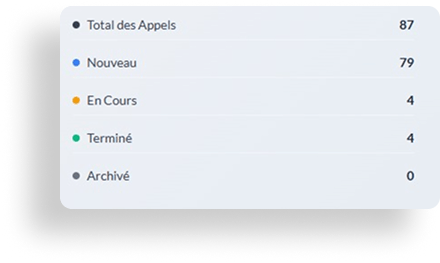
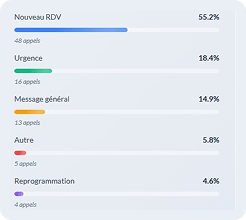
Every call becomes a clear summary, by email or in your management tool: reason, contact details, service requested, stated deadline and the next step set by your rules. The transcript and recording stay available, on our servers in Canada.
To do: call Mr. Gagnon back for a first meeting; engagement to be assessed by the partner.
These are the calls where caution matters most. It gives no tax advice: here is what happens.
Deduction, notice of assessment, strategy, reading a document: the question is noted for the professional in charge, with context, and they call back.
It confirms no information about a file, even if the caller knows the client’s name. Tax documents go to your firm’s upload channel.
Transfer for certain reasons or hours if you set it up, flagged message or a callback at opening: you choose, and your team decides the real priority.
Sophie is the office administrator at a four-person CPA firm. What she enjoys is seeing files move forward and clients feeling welcome. Yet in March and April, her days come down to chasing the phone.
Between two files to prepare, she explains where to drop off slips, answers those asking whether their return is done, politely turns away software vendors, while the documents pile up.
She thinks back to the entrepreneur who called one evening to hand over her bookkeeping. The message was heard three days later. She had chosen another firm.
That evening, facing a full voicemail box, she asked herself: what if every call got an answer, without interrupting the files?
With these 32 hours freed up each month, your firm could:
Others promise to answer 24/7 too. What matters for a firm is what the agent asks, what it will not say and what your team receives.
$200 or $340 a month, minutes included, with the setup fee published too. You know the price before the demo, and you can stop anytime.
No file information over the phone. Servers and recordings in Canada, AI providers bound by data processing agreements, PIA available on request.
Fewer interruptions during tax season. It takes calls during rushes, meetings and after closing.
Configured during onboarding with your calendar or practice management tool. Without integration, every call arrives as a summary from day one.
Compare AI receptionists in Quebec →Zenicall also answers for health clinics →
A well-received request may then need documents, a reminder or an action from your team.
Zenidata, the company behind Zenicall, builds automations that extend your phone reception: reminders for missing documents, fee reminders, alerts on pending files and connections between your tools. Start with reception, then hand over a specific follow-up.
A fixed monthly price, minutes included, no contract.
Your firm is starting to miss calls and wants to answer them without interrupting the files.
You get a lot of calls, with several professionals or several offices.
+ $495 one-time setup fee, paid at go-live (includes deployment, custom configuration and team training). Custom integration with your management software: from $1,000, quoted separately.
Describe a call that often interrupts your team. We will show you the questions asked and the summary you receive. Please describe your needs without including any client information.
We reply the next business day. No commitment.
No, by design. A question about a deduction, a notice of assessment, a tax strategy or a document is noted for the professional in charge, who calls back. Reception stays focused on information and routing; professional responsibility stays with your firm.
No. It neither confirms nor shares any file-specific information, even if the caller knows the client’s name. It takes a message and your team calls back. Tax documents and sensitive information are directed to the upload channel your firm uses.
It first clarifies the reason for the call, then asks the questions you chose: individual or business, service needed (bookkeeping, tax return, payroll, year-end), period concerned and any deadline mentioned. It never confirms that an engagement is accepted: your firm decides.
It shares the rates and explanations you approved. When a price depends on reviewing the file, it takes the request so someone at the firm can prepare the estimate.
Yes. You set a path for sales calls and requests that do not match your services. A call whose reason stays unclear is passed to your team for review.
Yes. It can take only unanswered calls, after-hours calls or a set window, depending on your line’s forwarding options. It is a good way to measure its value on a specific situation before widening the scope.
Yes. Call forwarding lets you keep your public number. We check the options with your phone system before activation.
Transfers to your front desk or the person in charge of a file are set up for the reasons and hours you choose. Booking in your calendar is possible with custom integration, configured during onboarding. Without integration, it takes a complete request and your team confirms.
No. Reception and qualifying new inquiries start without any access to your accounting or tax software. Every call arrives as a summary by email or in your management tool from day one.
An AI voice agent answers the phone out loud and understands what callers say in their own words, with no touch-tone menu. Set up for reception, it is called an AI receptionist. Zenicall is one, bilingual and built for firms in Quebec: it qualifies new inquiries, answers routine questions and passes anything that calls for professional judgment to the professional.
Zenicall is designed for Law 25. Our servers and your recordings are in Canada, and the AI providers that process calls in real time are bound by data processing agreements. A privacy impact assessment (PIA) is available on request. Your firm remains responsible for its clients’ information; Zenicall acts as a service provider.
Yes, we recommend transparency: it introduces itself as your firm’s virtual assistant. A client who wants to speak to someone can ask: it takes a message or transfers the call, depending on your setup.
No. It takes the calls no one can take: during meetings, tax-season rushes, evenings and weekends. Your team keeps welcoming clients and making decisions.
24 to 48 hours, remotely. Together we define the requests to handle, the information to collect, the approved answers and the handoffs to your team. You test a new inquiry, an existing client and a tax question to pass on before going live.
$200 or $340 a month, minutes included, plus a one-time $495 setup fee. Custom integration with your management software, if you want it, starts at $1,000, quoted separately. No contract: you can stop anytime, with a 30-day money-back guarantee. Details are in the Pricing section of this page.
No, by design. A question about a deduction, a notice of assessment, a tax strategy or a document is noted for the professional in charge, who calls back. Reception stays focused on information and routing; professional responsibility stays with your firm.
No. It neither confirms nor shares any file-specific information, even if the caller knows the client’s name. It takes a message and your team calls back. Tax documents and sensitive information are directed to the upload channel your firm uses.
It first clarifies the reason for the call, then asks the questions you chose: individual or business, service needed (bookkeeping, tax return, payroll, year-end), period concerned and any deadline mentioned. It never confirms that an engagement is accepted: your firm decides.
It shares the rates and explanations you approved. When a price depends on reviewing the file, it takes the request so someone at the firm can prepare the estimate.
Yes. You set a path for sales calls and requests that do not match your services. A call whose reason stays unclear is passed to your team for review.
Yes. It can take only unanswered calls, after-hours calls or a set window, depending on your line’s forwarding options. It is a good way to measure its value on a specific situation before widening the scope.
Yes. Call forwarding lets you keep your public number. We check the options with your phone system before activation.
Transfers to your front desk or the person in charge of a file are set up for the reasons and hours you choose. Booking in your calendar is possible with custom integration, configured during onboarding. Without integration, it takes a complete request and your team confirms.
No. Reception and qualifying new inquiries start without any access to your accounting or tax software. Every call arrives as a summary by email or in your management tool from day one.
An AI voice agent answers the phone out loud and understands what callers say in their own words, with no touch-tone menu. Set up for reception, it is called an AI receptionist. Zenicall is one, bilingual and built for firms in Quebec: it qualifies new inquiries, answers routine questions and passes anything that calls for professional judgment to the professional.
Zenicall is designed for Law 25. Our servers and your recordings are in Canada, and the AI providers that process calls in real time are bound by data processing agreements. A privacy impact assessment (PIA) is available on request. Your firm remains responsible for its clients’ information; Zenicall acts as a service provider.
Yes, we recommend transparency: it introduces itself as your firm’s virtual assistant. A client who wants to speak to someone can ask: it takes a message or transfers the call, depending on your setup.
No. It takes the calls no one can take: during meetings, tax-season rushes, evenings and weekends. Your team keeps welcoming clients and making decisions.
24 to 48 hours, remotely. Together we define the requests to handle, the information to collect, the approved answers and the handoffs to your team. You test a new inquiry, an existing client and a tax question to pass on before going live.
$200 or $340 a month, minutes included, plus a one-time $495 setup fee. Custom integration with your management software, if you want it, starts at $1,000, quoted separately. No contract: you can stop anytime, with a 30-day money-back guarantee. Details are in the Pricing section of this page.
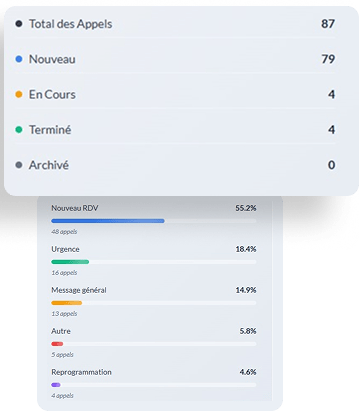
Zenicall is an AI receptionist for businesses and clinics in Quebec. After every call, your team receives a clear summary, by email or directly in your management software: reason, contact details, urgency and next step. An online dashboard with transcripts and statistics is also available on request.